Email List Decay Rate: How Fast Your List Goes Bad (and How to Fix It)
October 10, 2026
Quick answer
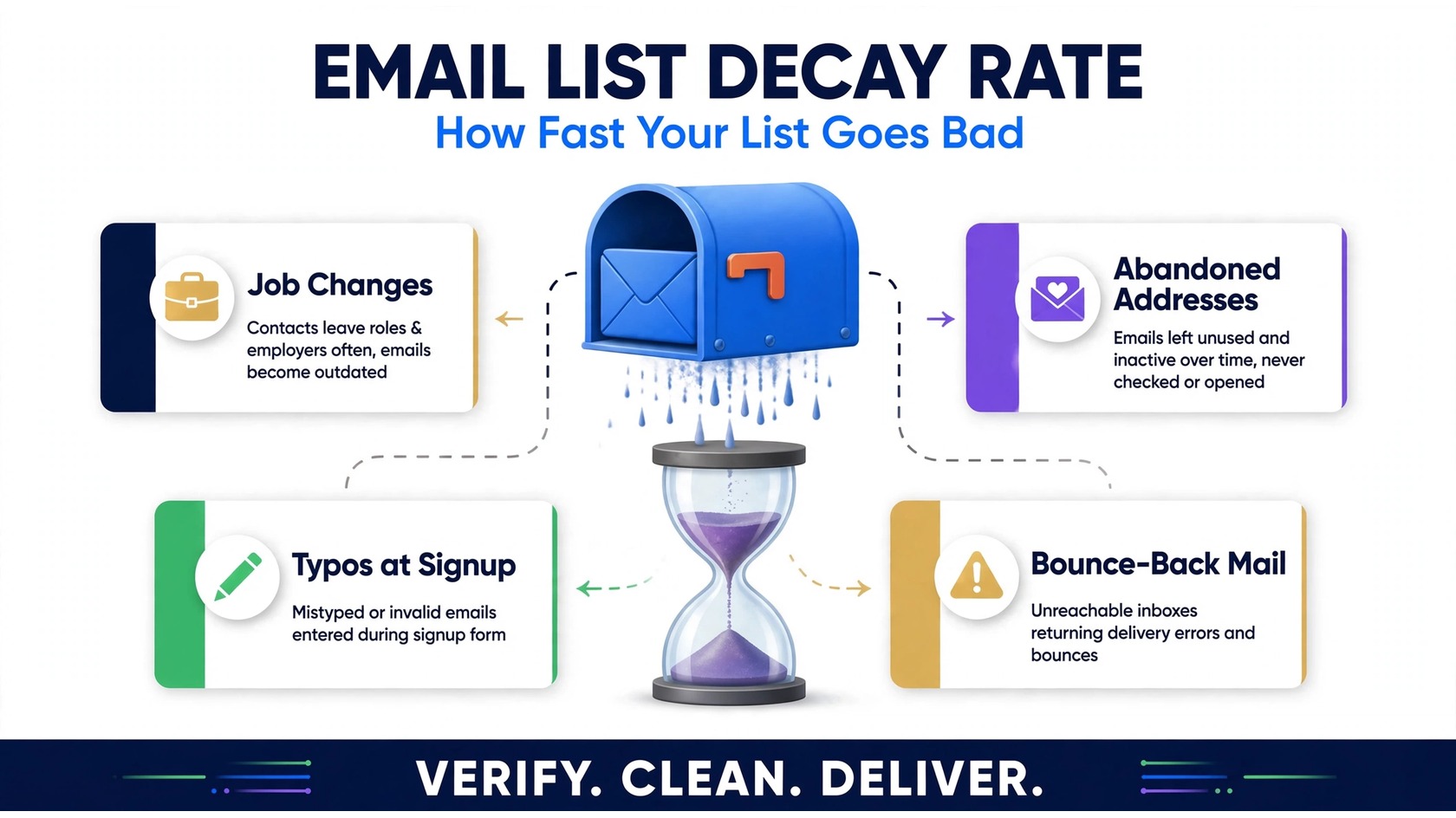
The email list decay rate is the speed at which the addresses in your database stop being valid or engaged. Every list decays over time: people change jobs, abandon old inboxes, mistype their addresses at signup, and entire domains get shut down. Many marketers report that a significant share of a list left untouched for a year is no longer reachable.
The fix is not sending more emails, it is maintenance. Regular email verification, re-engagement campaigns, sunset policies for dead addresses, and double opt-in at signup keep your list healthy. This guide explains what list decay means, how to spot and measure it, and how to reverse it before it wrecks your deliverability.
What does “email list decay rate” actually mean?
Email list decay rate describes how quickly contacts in your database become undeliverable or disengaged. It covers two kinds of loss. Hard decay means the address physically cannot receive your mail: the mailbox was deleted, the domain expired, or the person’s work inbox was deactivated when they changed jobs. Every hard bounce is hard decay in action.
Soft decay is quieter. The address still exists, but the person behind it has stopped caring, an abandoned inbox, or messages routed straight to spam. It looks fine in your database but contributes nothing, slowly dragging down your engagement metrics.
Why does the concept matter? Because it reframes list hygiene as ongoing maintenance instead of a one-time cleanup. Your list is a living asset, and assets with moving parts need scheduled servicing. Verification as a recurring habit, rather than an emergency fix, is what keeps inbox placement steady.
If you are new to the underlying mechanics, start with what email verification actually does, decay is the reason the practice exists in the first place.
The 5 reasons email lists go stale
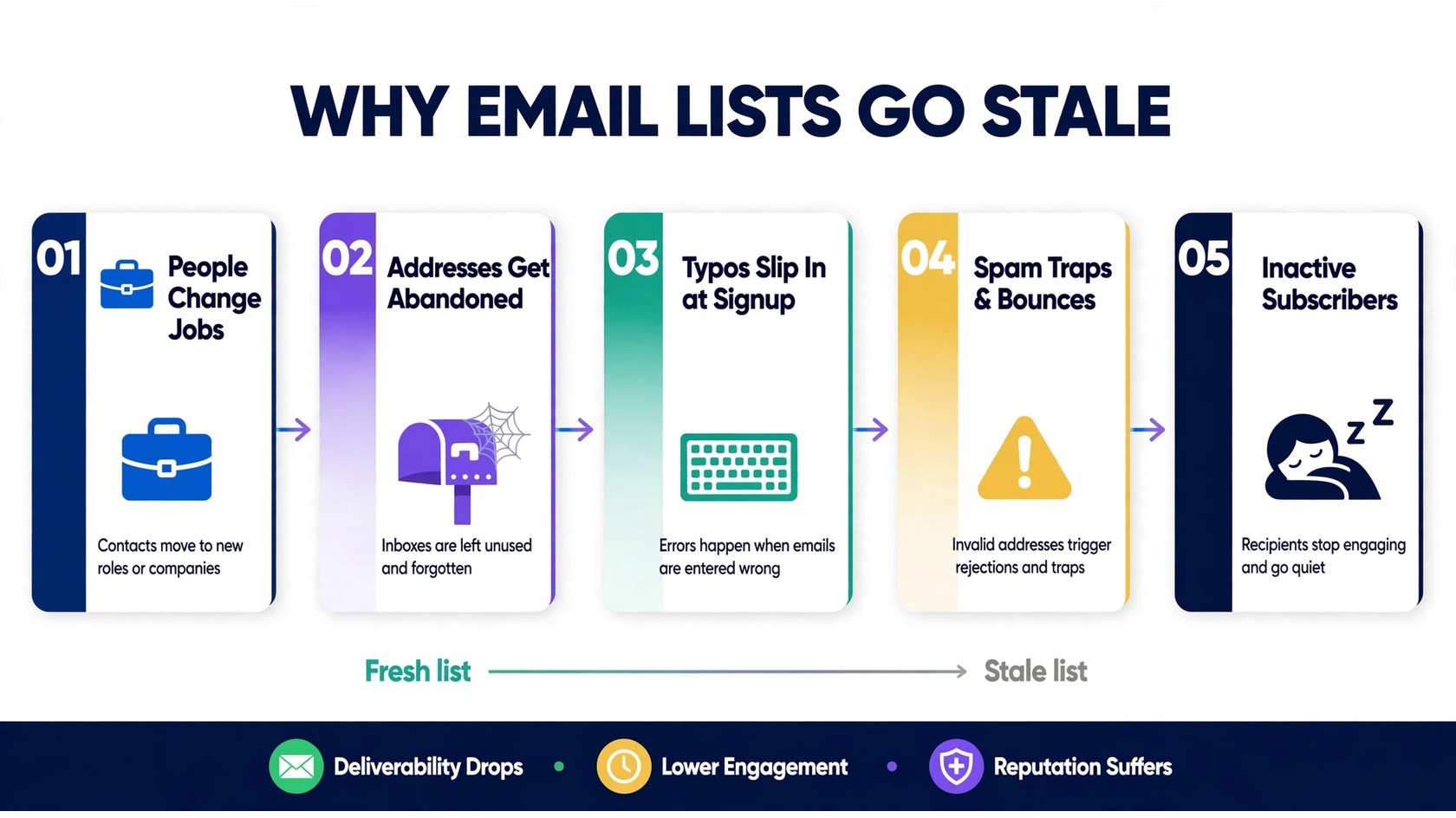
Decay is not one problem; it is five different problems wearing the same trench coat. Knowing which hit your list hardest shapes your response.
1. People change jobs and roles. When a contact leaves a company, their work email is usually deactivated within weeks. For B2B lists, this is the biggest driver of decay, professional turnover quietly invalidates work addresses year after year. An address that delivered in January can hard-bounce by June with no warning.
2. Personal addresses get abandoned. Consumers switch providers, forget passwords, or use throwaway addresses for one-time signups and never check them again. The inbox technically exists, but nobody opens it.
3. Typos and fake addresses slip in at signup. Every form without real-time protection collects its share of “gmal.com” mistakes, plus deliberately fake addresses from people chasing your lead magnet. These were never valid, so they count as decay from day one.
4. Domains and mail servers die. Businesses close, startups rebrand, and personal domains lapse. When a domain disappears, every address on it bounces permanently, while your database keeps them as if nothing happened.
5. Subscribers quietly disengage. The mailbox works, but the human behind it tuned out months ago. Disengaged contacts do not bounce, so they evade every deliverability metric except one, and they drag your engagement rates down with them.
7 warning signs your list is decaying
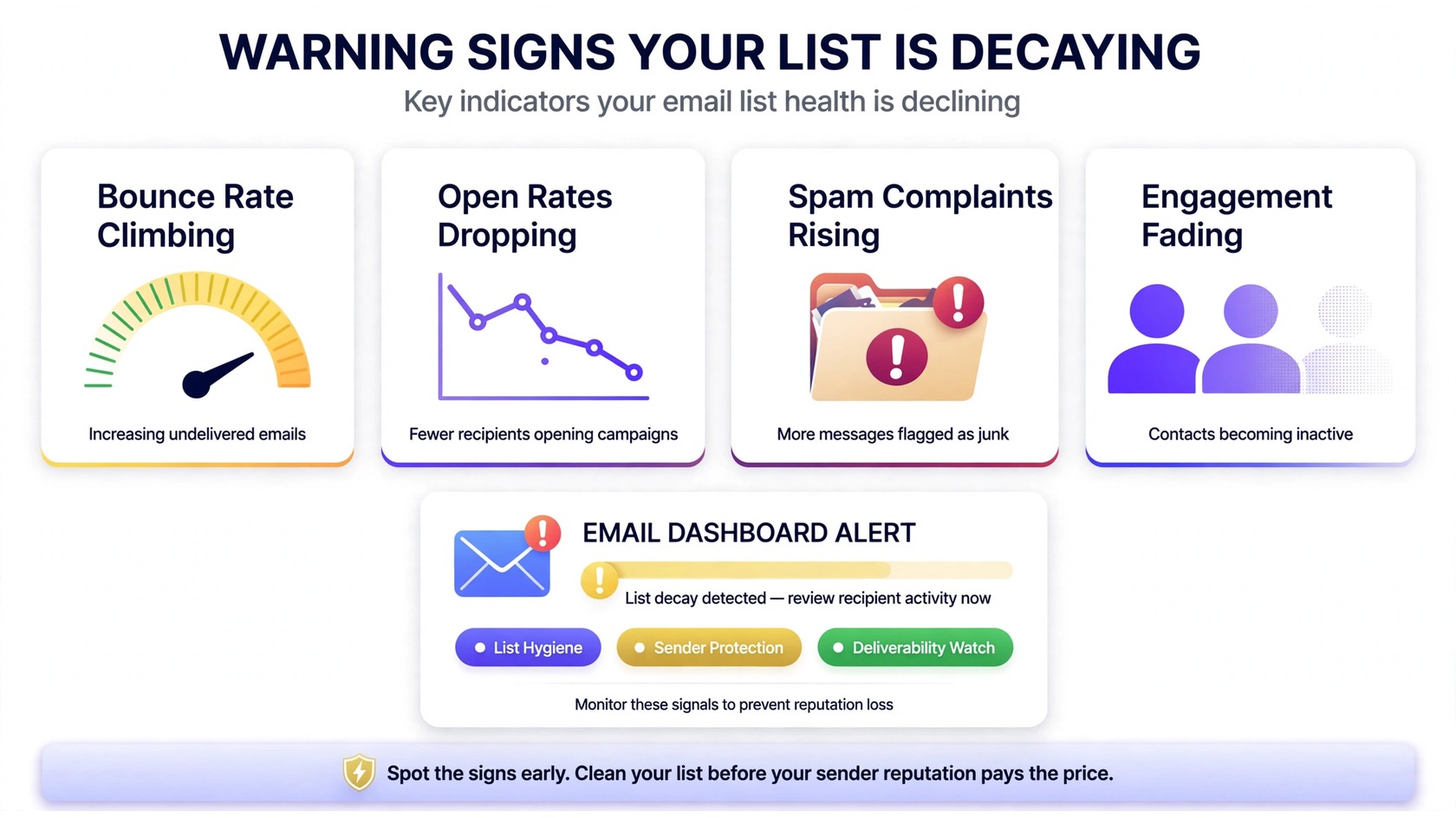
Decay rarely announces itself with a single dramatic event. It shows up as a slow drift across several metrics at once. Watch for these signals:
- Bounce rates creeping upward. A rising share of hard bounces, “mailbox not found” or “user unknown”, is the most direct symptom of hard decay.
- Open rates sliding over time. When a growing portion of your list never opens anything, you are looking at abandonment and disengagement. If your open rate has been dropping steadily, decay is a prime suspect.
- Click-through rates declining. Clicks fall even faster than opens when a list decays, because only genuinely engaged humans click.
- Spam complaints ticking up. Abandoned and disengaged recipients are more likely to hit “report spam” instead of unsubscribing. Rising complaint rates mean mailbox providers are watching you closely, and getting flagged as spam sets off a chain reaction you want to avoid.
- Engagement concentrating in a shrinking core. If each campaign gets its opens from the same small group while the rest stays silent, your “big” list is really a small healthy list in disguise.
- Sender reputation slipping. Low engagement plus high bounces trains mailbox providers to distrust you. Domain and IP reputation both erode when decay goes unaddressed.
- Blocklist warnings appearing. Sending repeatedly to dead addresses and spam traps can land you on a public blocklist. If a monitor flags you, learn what a blocklisting means and how to get removed, then fix the underlying hygiene problem.
One or two of these can have innocent explanations. Four or five at once almost always means decay.
How to measure your list decay rate
You cannot fix what you cannot measure. Four practical ways to put a number on your decay:
1. Run a verification pass. The most direct measurement is a bulk verification of your full list. The share flagged as invalid, disposable, or risky is your current decay snapshot. Make sure the tool does mailbox-level checks, not just syntax: know what verification actually checks. For context on interpreting result categories, see Mailercloud’s 2026 service roundup.
2. Track the invalid share over time. One verification tells you where you stand; repeat verifications tell you how fast things move. Re-verify quarterly and log the invalid share. A list whose invalid share grows noticeably between checks is decaying fast and needs more frequent cleaning or better signup protection.
3. Watch bounce and engagement trends. Export your campaign metrics and plot hard bounce rate, open rate, and click rate over six to twelve months. Decay shows up as slow, steady deterioration rather than sudden cliffs. Learn the vocabulary first, the key email deliverability terms, so you read your reports correctly.
4. Compare new subscribers against old ones. Segment your list by signup date and compare engagement. If last month’s signups open at a healthy clip while two-year-old contacts are silent, the problem is decay, not content. That segmentation also tells you where to focus re-engagement and sunset efforts.
A spreadsheet, your ESP’s reporting, and one verification tool are enough to build a reliable decay baseline for any list.
How to fix a decaying list: the 4-step maintenance cycle
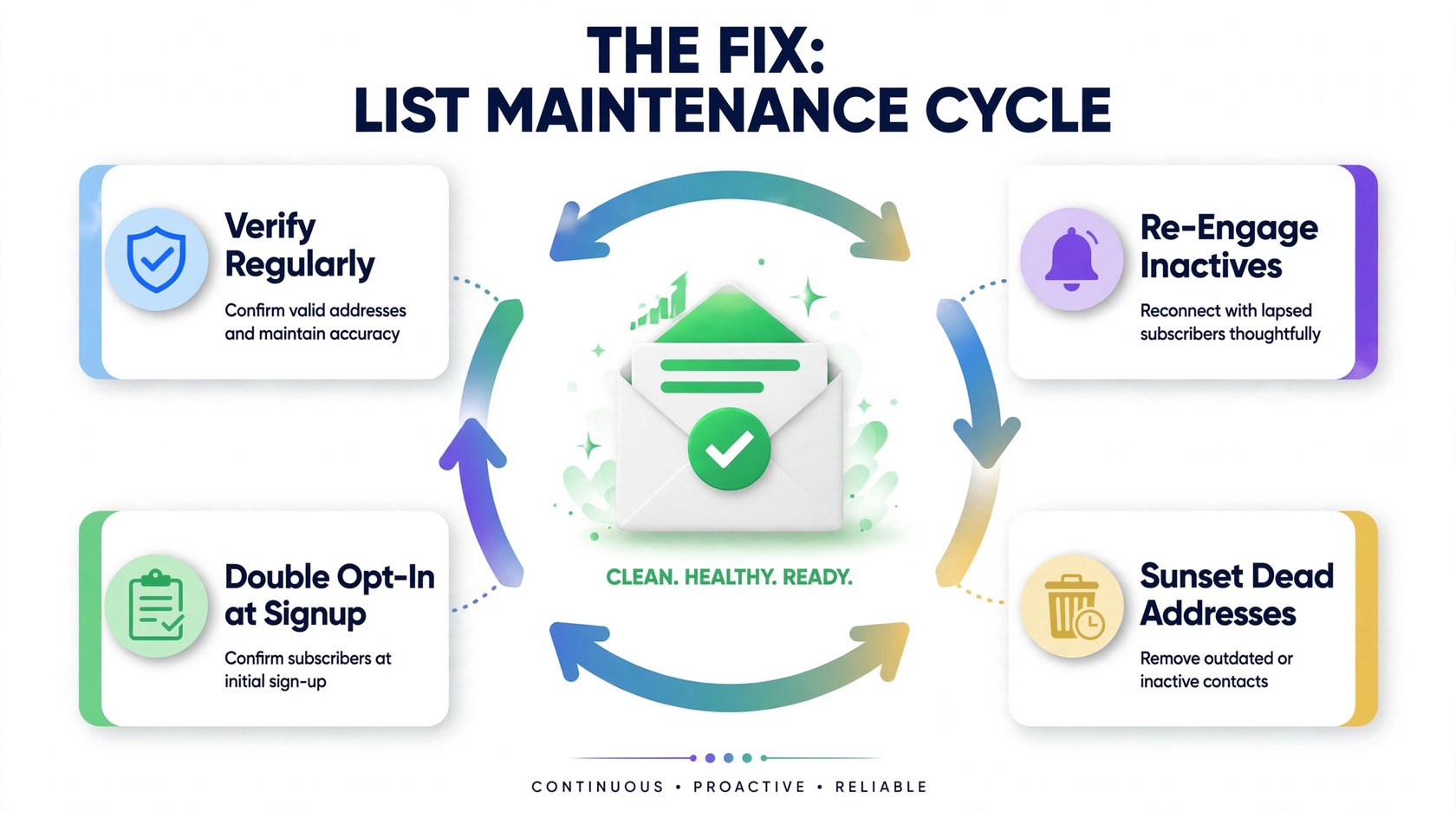
Decay is inevitable, but a decaying list is a choice. These four steps form a maintenance cycle that keeps lists healthy indefinitely:
1. Verify regularly, bulk and real-time. Scheduled bulk verification is the backbone of list hygiene: re-verifying every few months removes the hard-bounce addresses that accumulate between sends. Pair it with real-time verification at signup to stop typos and fake addresses from entering in the first place, that combination turns verification from a rescue operation into a routine.
PureListVerifier is built for exactly this cycle: bulk list cleaning for the scheduled passes and an email verification API for catching bad addresses at signup. It flags invalid, disposable, and risky addresses so you can remove them before they cost you deliverability. For independent background on how verification works under the hood, see Sender.net’s 2026 comparison, and for the budget angle, what affordable verification looks like in 2026.
2. Re-engage inactives before giving up on them. Before sunsetting a contact, give them a reason to come back: a targeted win-back campaign, a preference-center update, or a plain “we miss you” sequence. See how to win back subscribers who stopped opening. Those who ignore even a good win-back are telling you the truth, believe them.
3. Apply a sunset policy to dead addresses. A common rule: no opens in 6–12 months plus a failed win-back campaign means suppression. Dead contacts cost you money and reputation while buying you nothing.
4. Require double opt-in at signup. Double opt-in, where new subscribers confirm via a link in a confirmation email, is the single most effective way to slow future decay. It blocks typos, traps, and fake addresses at the source, because an address that cannot receive mail can never confirm. Your list will grow slightly slower, but every address on it is real and recently engaged.
Together these four steps form a loop: verify what you have, win back what you can, remove what you cannot, and stop bad addresses from entering in the first place. Here is how the verification side of that loop works.
How often should you clean your email list?
There is no universal cadence, but a practical starting point: verify new signups in real time via API, re-verify your full list every 3–6 months, and always verify before a major campaign or after a long sending pause. B2B lists with heavy job turnover should lean toward the frequent end.
Think of cadence as cost versus risk. Each verification pass costs credits; each unverified campaign risks bounces and reputation damage that are far more expensive to repair. Most teams find a quarterly rhythm is the sweet spot. For plan details, see the PureListVerifier FAQ, current rates are on the pricing page.
FAQs
What is the email list decay rate?
The email list decay rate is how quickly addresses in your database become invalid or disengaged over time. It includes hard decay (mailboxes deleted, domains expired, work emails deactivated when people change jobs) and soft decay (addresses that still exist but whose owners abandoned them or stopped engaging).
How fast do email lists decay?
It depends on your list and how you built it. B2B lists tend to decay faster because professional turnover deactivates work addresses continuously. Lists built with double opt-in and real-time verification decay far more slowly than lists assembled without signup protection. The best way to know your own rate is to verify your list, then re-verify it a few months later and compare the invalid share.
How do I know if my email list is decaying?
The classic symptoms: rising hard-bounce rates, falling open and click rates, growing spam complaints, and engagement concentrated in a shrinking group. If you see several of these together, run a bulk verification, the invalid and risky share will confirm how far decay has gone.
Does removing inactive subscribers hurt my list?
No, it helps it. Inactive contacts do not buy, do not click, and drag down the engagement metrics that mailbox providers use to judge you. A smaller, engaged list consistently outperforms a large, decaying one on deliverability, inbox placement, and revenue per send.
How often should I verify my email list?
Verify new signups in real time with an API, re-verify your full list every 3–6 months, and always verify before major campaigns or after long sending gaps. Lists with high B2B turnover or aggressive list growth should clean more frequently.
What is a sunset policy for email?
A sunset policy is a predefined rule for removing chronically unengaged contacts, for example, suppressing anyone with no opens in 6–12 months who also ignored a win-back. It turns “we should clean the list someday” into an automatic, repeatable process.
Can double opt-in stop list decay?
Double opt-in cannot stop decay entirely, people will still change jobs and abandon addresses, but it dramatically slows it. It guarantees every address was real and engaged at signup, eliminating typos and fakes from day one, a major early source of decay.
The bottom line
Your email list decay rate is not a number you measure once, it is a force you manage forever. Every list loses addresses to job changes, abandonment, typos, and disengagement; the senders who thrive are the ones who built verification, re-engagement, and sunset policies into their routine. Start today: run a verification pass to see where you stand, then put the maintenance cycle on a schedule. Ready to see how many dead addresses are hiding in your list? Try PureListVerifier and clean your list before decay costs you another campaign.